

The Walking Dead: Survivors (TWD: Survivors) is a free to play mobile game where you may be wondering how to change region. Not everyone knows that there are over a hundred different servers people are playing around the world. While there may not be a way to pick a specific server, there is still a way to change it using an item. Continue reading our guide on how to change region below.
How to Change Region in TWD: Survivors
If you’re just starting out and getting bullied or looking to switch regions to meet up with other friends, here’s how. A quick disclaimer, we haven’t used this feature ourselves, so we’re not positive whether you can choose a specific server or not. If you use it, be sure to comment below the article and let us know so we can tell others too.
Otherwise, the main pre-requisite before switching regions is that your Town Hall is below level 6. If you’ve already passed this Town Hall level, there doesn’t seem to be a way to do it still. You may be able to contact the developer via their social media channels like Facebook, Twitter, or Discord for help, however. Regardless, so long as you’re below level 6, follow these quick steps to change regions:
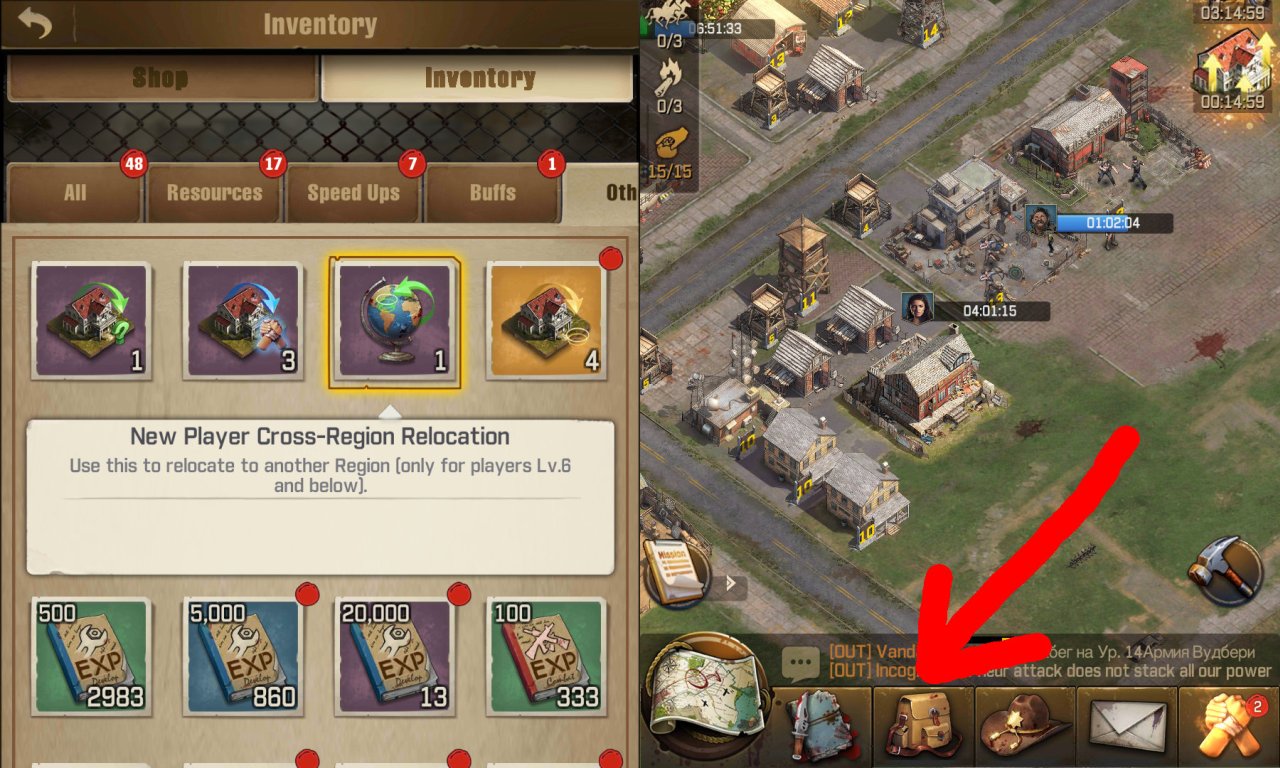
- Open up your inventory by tapping the backpack at the bottom of the screen. You may need to complete the tutorial if the backpack isn’t visible yet.
- Tap the Other tab to find the item you need more easily.
- Then, look for a picture of a globe with an arrow wrapped around it. Tap this item, it’s called the New Player Cross-Region Relocation.
- Now tap the button that appears to relocate to another region/server.
Another quick disclaimer: This isn’t the same as relocating your base to another area in your current server. If you’d prefer to do that, you can visit our guide on How to Relocate in TWD: Survivors here. This method moves your base to a different region/server with different clans and players.
If you have any other questions for us about TWD: Survivors, comment below the article asking for help. And we’ll try to get back to you as soon as possible if we can help. Otherwise, be sure to visit some of the other useful guides we have here at Slyther Games below.

Jeff is a journalist with over 10 years of experience writing, streaming, and making content about video games. With an associate degree in journalism, he’s a sucker for RPGs, survival games, roguelikes, and more.


10 responses to “TWD: Survivors – How to Change Region”
nope, it doesn’t work like that.
You have to go to the map view. The zoom out till you see the globe icon at bottom right. Then clicking on that you can search the regions and selecting one you can change region if your town passes all the listed conditions
i am level18 TH and i want to change server, it ia possible? and how?
You can try going through Customer Service, but otherwise, there wasn’t a way when I was playing actively.
How many days new region appear?
How many days do the new server appear?
Hey Rokia, I believe they add new servers when they have too many players.
Only have 6 days stay in recent server to change new server, is it true?
Will a region reopen after it closes??
Hey Bubba, I don’t know for sure but it’s possible they could reopen if the region drops in enough players. Due to how progress works in TWD: Survivors, I’d be surprised if a region reopened though.
My townhall lvl 6 state 368..and i want to relocate to region 353.. Can you help me
Clan name DEADLY SB